
Security and deployment
Runs in your environment. Reads structure, not your data.
Bayanis installs in your environment and reads the structure of your sources without copying the data. Where a feature needs values, such as quality rules or live samples, it reads them from the source when needed and keeps only the results.
At a glance
What your IT and security review will ask.
| Area | What is included |
|---|---|
| Installation | Docker on your own server, online or offline package, one-command upgrade and rollback, your own PostgreSQL if preferred |
| Sign-in | Local accounts with two-step verification, LDAP, single sign-on (OpenID Connect) |
| Access | Four user roles, domain access, and roles scoped to a source, schema or table |
| Encryption and secrets | Stored passwords and keys encrypted with AES-256-GCM, optional HashiCorp Vault, key rotation |
| Personal data | Masked in samples by default, with an approved and audited route to clear text |
| Audit | Who changed what, background jobs, exports and imports, access to live data, and consent |
| API and integrations | Read-only API with an OpenAPI description and revocable tokens, optional ServiceNow tickets |
| Release security | Signed images, software bill of materials, provenance |
| AI | Managed API, cloud model in your region, or self-hosted model; metadata only unless you allow samples |
| Connectors | 16 technologies in 6 groups, plus custom connectors. See all connectors |
Installation
From package to running platform.
Install
Run Bayanis with Docker on your own server, from the online or offline package. Use your own PostgreSQL if you prefer.
Connect
Add your databases, files, data lakes, BI and integration tools. Credentials are encrypted, or kept in HashiCorp Vault.
Upgrade
Move to a new release with one command, and roll back with one command if you need to. Every image is signed.
Languages
Multilingual by design.
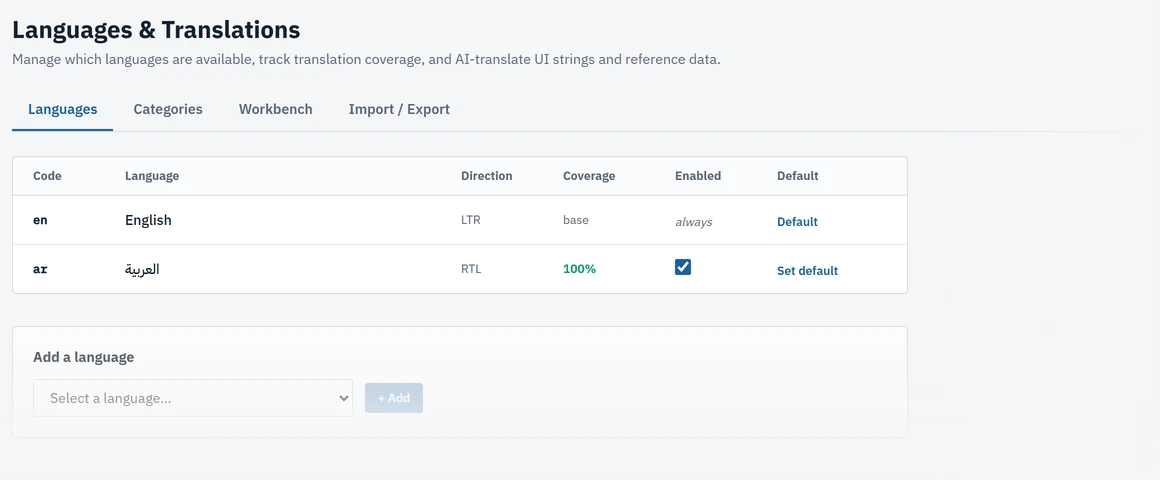
English and Arabic are included, and administrators add more languages under Languages & Translations.
- Any language your teams useAdd a language, choose its direction, and track how much of it is translated.
- Left to right and right to leftThe whole layout mirrors for right-to-left languages, including navigation, tables and PDF exports.
- Translation built inInterface text and reference data such as domains and categories can be translated with AI, then reviewed and edited, or exported and imported for a translation agency.
- Each person choosesEvery user picks their own language, and the organisation sets the default.
See Bayanis with your own questions.
Book a demo and we will walk through the parts that matter to your team, from catalog and quality to privacy and compliance.